Friday, October 28, 2011

What I learned from the Gobelins Master Class on Animation pt1

A week ago I attended the Gobelin Master Class in Animation in Delasalle CSB.  What intrigued me about it was that the speaker, Alexandre Heboyan, had worked in Dreamworks Animation on the movies "Kung Fu Panda and "Monsters vs Aliens"  I absolutely loved Kung Fu Panda and while I've never watched Monsters vs Aliens I have the art book for both of these movies on my shelf and frequently refer to them when looking for inspiration.  While the class was certainly focused on animation (for example, there were specific example about how long an animation for blinking the eyes should be, I think it was 6 frames) there was a lot in there that is applicable to illustration in general.  I'd planned on writing a wonderful article here that distilled the essence of everything I'd learned into a neat little package of inspirational passages.  But then I got lazy.  Instead I'll just go through the pages of my sketchbook one by one and touch on the specific things that I felt were very useful to me.

Choosing the Right (Camera) Angle


When discussing this topic Alexandre referred to choosing the right camera angle, since animation works in film terms.  He talked about finding the right camera angle for your scene and locking on to that angle.  In terms of illustration the camera metaphor can be useful but if it's confusing just think of it as your viewing angle.  What angle are you looking at your subject from?  What angle best serves your purpose in storytelling? The most striking way he explained it is in the simple illustration above, which I copied from the whiteboard.  In both boxes a sad person is shown.  Neither angle is wrong, per se, but the second one sells the story more.  Why?  Because lets say you blocked the shape in total black, the first illustration would basically look like a lump of unintelligible black mass.  But if you blocked in the second shape, it would instantly read as a sad person, even without any kind of detailing.  To be able to express that emotion as quickly as possible helps you sell the story of the image, which is of sadness and dejection.  There's a note above the second drawing that says "follow the movement/direction".  If ever you're not sure what your angle should be, try to see what direction your character is moving in, what emotion you're trying to express, and set the angle accordingly.

Body Staging


Body staging refers to the positioning of characters in your illustration and how that can help you sell your story.  My favorite example of this is when he talked about two people on a date.  In the first box you can tell that the couple are in love because of their positioning towards each other.  They mirror each other and almost seem magnetically attracted to each other. In the second box is a couple out on a first date.  The one on the right (let's assume he's the guy) is totally into his date and very eager to make a connection.  The girl is a little freaked out and edging away from him.  I love how these primitive shapes clearly explain the relationship between the two characters in an almost yin-yang fashion.  I can imagine this positioning being useful in a variety of illustrations, like ones that show a duel between two characters.  

Silhouette


This rather straightforward and somewhat related to the Camera Angle.  Basically Alexandre was trying to get across that you should always try to make sure that your silhouettes aren't boring.  If the character is shown in an angle that conceals his limbs for example, try to find a different angle where he can be more expressive with his limbs or simply exaggerate his posture somewhat so that the limbs are sticking out and don't just blend into the silhouette of the body.  There are exceptions to this of course, for example if being still or unmoving is a characteristic of your character, or perhaps if the shape of your character's body already shows a good enough silhouette that they're instantly recognizable.

 Using Diagonals


This is something that Alexandre stressed in many of his topics. which is the use of diagonals.  I thought this particular example illustrated it most clearly though.  In the first box is a man who's eyes, eyebrows and smile are all parallel to each other, making for a rather boring image.  Now if it's slightly skewed diagonally, as in the second box, it becomes more interesting.  It reminded me of an age old artistic term, the contrapposto.    The point is to always try to skew things a little bit so that they're not boring to look at. 

I think I'll stop here for now.  Since the following topics I'll talk about all revolve around how to use specific body parts to express emotion, they naturally segregate themselves into another post.  If you have any comments and suggestions please feel free to get in touch with me!

Tuesday, October 25, 2011

Figure Drawing in Pencil 2


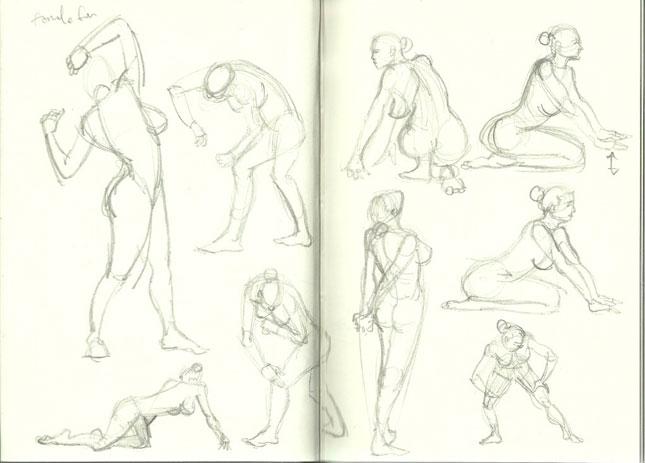
I'm still working up the energy to do a post on what I learned from the Gobelin Master Class in Animation, but in the meantime here's a filler post of more figure drawing, since a lot people seemed to like it (most hits I've had on any post, bizarrely enough).  I'm trying to keep to a schedule of doing figure drawing for 30 minutes every day, and this is part of that series.  Eventually I'll be working with different media like charcoal and penbrush just to keep me from getting bored, so expect more of that soon.


Friday, October 21, 2011

"Water Gun Sky Attack Solves A Problem Like Maria" Back Cover Process pt4

This is the fourth and last post in my series of creating the back cover for Water Gun Water Gun Sky Attack Solves A Problem Like Maria"'s EP "Decompose.  You can find the first post here.

WIP8


At this point of the artwork I'm feeling pretty confident already about things.   I've made some improvements, especially by adding a cement base that can more easily show the impact of the car while at the same time still hold up the sign.

However at this point I'm wary of any more critiques because I'm already starting to feel tired of looking at the same piece for the past couple of weeks.  I should also ideally be able to critique my own work since I won't always have an art director looking over my shoulder.  So I decided to go on my own for the last stretch of the piece, and circled out some areas that I knew would need fixing.

In terms of the flow of the piece, two things really caught my eye.  First was the bit of farmland in between the buildings that is lit up.  This distracts the eye from the flow because it's surrounded by adjoining areas of darkness, giving it more luminosity than it should have. Second is the metal borders of the rooflights.  They hook your eye and distract you from the flow of the piece, which should ideally be from the sign to the girl then following the dirt path to the town.  Other minor issues like blown out highlights also need to be controlled, as well as finalizing what font I'll be using for the sign.

WIP9


Here I've fixed up the lighting issues by adding some elements (the more trees and buildings) to controls the flow of the piece.  This is something that I learned from watching Jason Manley's video.  In the same video he also mentions trying to stick to a 60/30/10 ratio of lights, darks and midtones. For example in this piece I was going for 60% dark, 30%light and 10% midtones.  I didn't quite get it perfect since to me this looks more like 50% dark, 30% light, and 20% midtones.

This is pretty much done.  I'm going to add some textures and weathering to the sign as well as some cleaning up here and there but essentially I'm pleased with this and am ready to wind down.

FINAL


This is the final piece that I will be submitting.  I've added a few textures here and there and some weathering effects to the sign.  I've also changed the shape of the roof lights to make them easier to render and tried to control the lights and darks some more to reach that 60/30/10 goal.  While I'm never really satisfied with my work I can step away from this knowing that I learned a lot, and I hope you guys were able to pick up a thing or two as well.

A lot of help came from the guys at cgsoicety and conceptart.org so I'd like to give them a shoutout.  Lunatique aka Robert Chang was a great help.  If you thought his advice to me was solid you should definitely think about attending his online workshop.  I can't really afford it right now but based on the comments it looks like folks have found it mighty useful in their careers.

If you liked this series of posts or found them useful I'd definitely appreciate a comment and any suggestions to make them even better!

Wednesday, October 19, 2011

Figure Drawing in Pencil 1


Just to break things up a little bit, some figure drawing exercises using the book Body Parts by Simon Jennings. I'm planning on doing a little figure drawing everyday for the next few weeks, so there may be more of this soon.


Tuesday, October 18, 2011

"Water Gun Sky Attack Solves A Problem Like Maria" Back Cover Process pt3

WIP5


In the last installment of this series, I'd just made major changes to the layout of the piece after having come to a point that I thought was acceptable.  Looking at it now I realize that this is a much improved piece, and I'm glad I made that decision.  I made a few changes to the piece since the last iteration, so let me go over them one by one.

The most important change I made was to flip the truck over so that it was facing the sign instead of the town.  I've added to the narrative I created earlier by having Panic crash into the sign while being attacked by zombies, rendering the car useless.  What I like about this is that it gives reason to the sign being there.  It wasn't just up as a composition element but now fits neatly into the story.  Having the car facing the sign also allows me to use its roof lights as a lighting device for the sign.  Although I'm not sure it ultimately matters, this kind of efficient use of space in an illustration tickles my brain and I like to do it as much as I can.

I also changed the background elements some so that the flow of the piece is more clearly illustrated, starting from the sign, some minor emphasis on the zombies, then the girl, then finally the town.  Some of you might notice that I left out the "flow arrow" in the last iteration, and that's because at the time my composition was very broken.  Now it's fixed up so I go once again into a value study.

Value Study 2


After posting I got these replies from cgsociety:


petersk: 
Looks better now. 
The only two crits I have now are that the base of the sign looks more like a fence (I imagine it would be one column, like a billboard), and that you should have a stronger light falloff on the sign in order to look realistically lit by the car lights, except if they are super wide angle.

Lunatique
You previous composition with the moon/building higher was better, because now the sign and the moon/building line up side-by-side and occupy similar amount of space in the image--that's not really a good thing for composition.

According to your narrative, I thing the sign has to look like it's been hit hard and partially destroyed--same with the front of the car. You want to spell these things out clearly, so your audience won't have to guess at what's going on. It's also important to show a couple of zombies as very obviously walking dead corpses, or else they just look like dead people she might have killed. You want to show the rotting flesh, limbs hanging off a tendon, jaw missing, eye missing...etc.

Bearing that in mind, I came up with this:


WIP6


I mostly just started adding color here, and there aren't many major composition changes.  I'm not going to go into too much detail about my coloring method since I conceived of this series mostly as an exercise in composition.  However the simple explanation (for someone well versed in Photoshop) is that I used my value study as a base, then created separate overlay layers for the background (forest, path, town moon, sky etc.) and the foreground (sign, truck, girl, zombies).  I then painted some flat colors on each layer to try to establish a mood. On top of each specific layer I then added a normal layer that I would paint on for the final piece.  These layers are the ones I will spend the most time working on.  It's similar to the method Donato Giancola uses in his oil paintings, except obviously its much easier to do in Photoshop than with oils.

One big difference was Lunatique's suggestion that there was too much balance between the sign and the moon/town, which led to bad composition.  I changed that by making the moon smaller and it made a world of difference.  Everything is much more balanced now and aside from some slight tweaks here and there this will be the base of my final composition.  Which isn't to say there aren't things to work on.  Indeed, after I posted this, I got this comment:

Lunatique
The lighting currently doesn't look convincing because despite your two main light sources being very directional, your main focal point doesn't reflect that enough--it looks too diffused, with too much ambient brightness in areas that are facing away from the light sources. 

Is the red lighting on her from the car's rear lights? If so, you need to consider just how far can the rear lights actually reach behind itself to get to her. Most likely only her feet and calves would be lit by the rear lights, and the rest of her quite dark (being back-lit by both the moon and the headlight bouncing off the sign). You can try to depict maybe a fire close by off camera, so she could be illuminated by the fire.

Now I'll admit that lighting is a very big weak point in my work.  I simply haven't devoted enough time to it to really understand how light works so I don't know that my next step really addressed Lunatique's concerns.  Along with color, lighting is another element of illustration that I need to devote time to.  Bearing that in mind, this is the next WIP I came up with.  

WIP7


I'll leave it at this for now since this post is pretty long.  The next post will be the last one in this series and it'll address the process of cleaning up the image so that everything looks right.  There won't be major changes from this basic painting, but there will be a few key things that I made changes to that I think are very important to discuss.  Till next time!